![ProjectTeam Logo - White with colored dots-2.png]](https://help.projectteam.com/hs-fs/hubfs/ProjectTeam%20Logo%20-%20White%20with%20colored%20dots-2.png?height=28&name=ProjectTeam%20Logo%20-%20White%20with%20colored%20dots-2.png)
New features included in this release:
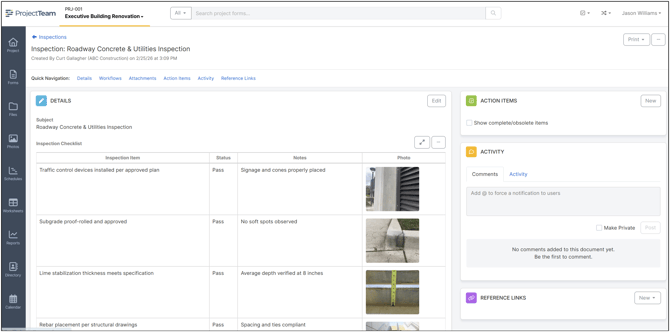
Photo Field Type
Administrators can now add a Photo field type when designing custom forms. This field allows users to upload and display photos directly within the form, not just as attachments.
When completing the form, users will see a thumbnail preview of the photo inline with the form content. This makes it easy to visually reference images alongside related information. For example, in inspection forms, users can attach a photo of an issue and immediately see it next to the text describing the observation.
Photos captured in the Photo field are also available when creating reports and merge templates. When designing print layouts, administrators can place the photo field anywhere in the output, allowing images to appear in the exact location needed within the generated document.
Digital Signature Markup
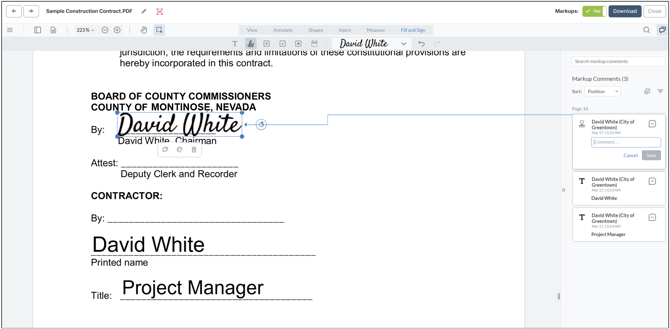
ProjectTeam.com now includes a simple digital signature markup tool that allows users to add their signature directly to files and place it anywhere on the document.
Each signature is automatically recorded in the markup activity area, showing the user who applied the signature along with the date and time stamp. This provides clear traceability for approvals and acknowledgements captured within the form.
In addition to digital signatures, users can apply several other quick markup symbols to support document review and verification, including a date stamp, cross mark, tick mark, and dot mark. These tools make it easy to annotate documents and visually indicate approvals, checks, or issues directly within the form.
Contract Currency
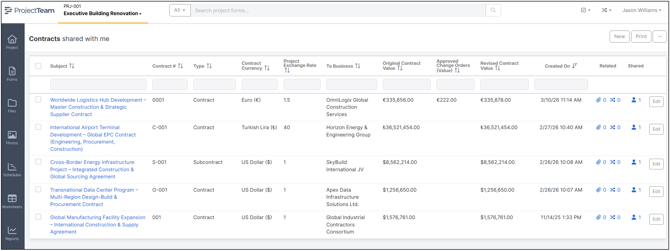
Project Administrators can now configure projects to support multi-currency contracts. When this feature is enabled, users can select the appropriate currency for each contract during contract creation.
Contract log views will display the currency symbol associated with each contract, allowing projects with multiple currencies to be clearly tracked in a single view. The project exchange rate is also displayed to help users understand the relationship between contract currencies and the project’s base currency.
The selected contract currency remains consistent across all related contract management processes, including Potential Change Orders (PCOs), Change Orders, and Payment Applications.
By supporting multi-currency contracts, ProjectTeam.com allows organizations working on international projects or multi-national contractor teams to manage financial information more clearly and accurately within a single project environment.
Other updates and bug fixes 🐛
NEW: A Select All option has been added to the Edit Favorite Form Types modal, allowing users to quickly search and select multiple forms at once to display on their home screen.
NEW: A Select All option has been added to the Configure Form Log modal, enabling users to easily search for and select multiple columns to display in their log view.
NEW: A search field has been added to each column in the Configure Form Log modal, allowing users to quickly find and add key fields without the need to scroll through long lists.
NEW: In the reporting area of each project, the “My Access” and “My Company Reports” sections are expanded by default, allowing users to quickly run reports without navigating through reporting folders.
NEW: Project Administrators can now bulk delete all unused Account Codes on a project.
NEW: Only Project Administrators can approve documents on forms such as Budget Items, Budget Amendments, Contracts, Change Orders, and Payment Applications.
NEW: Only Project Administrators can update Payment Application SOV line item details, including Description, Unit Price, UOM, Quantity, and Scheduled Value.
NEW: Added Peruvian Sol and Argentine Peso to project currencies.
NEW: The file viewer style has been updated to better match the standard user interface.
NEW: Show a reminder icon in the top navigation bar when a user is required to update their password.
NEW: Infinite scroll added to the company fields list to help load times for organization's that have a lot of custom company fields configured.
NEW: The login screen in the FedRAMP environment has been updated to display FedRAMP and GovRAMP logos.
FIXED: When creating simple formulas in the Worksheet tool (e.g., Cell 1 + Cell 2), the cursor now remains in the current cell so users can complete the formula without clicking back into the field.
FIXED: In the Worksheet tool, users can press ENTER on the keyboard to move to the cell below.
FIXED: Pressing ESC on the keyboard no longer closes a worksheet or schedule when in fullscreen mode.
FIXED: Custom formula fields on forms now update automatically in edit mode as values are entered, eliminating the need to save before seeing calculated results.